41 41. Putting It Together: Architecting a Web App with AI
This page pulls the whole “How the Web Works” part together. You will take a product idea, break it into the building blocks from the previous pages, draw the architecture, and use Claude Code as a design partner - before writing a single line of code.
41.1 The idea: a club event sign-up app
Student clubs run events, and sign-ups are messy: spreadsheets, group chats, no-shows, nobody knows who is on the waitlist. The idea, “ClubHub”:
- Members browse upcoming events, sign up with one click, cancel, join a waitlist when an event is full, and get a reminder email the day before.
- Officers create and edit events, set a capacity, see who signed up, and export the list.
- Some events (a trip, a formal) cost money, so members pay online.
- Nice to have: an AI helper that drafts an event description from a few bullet points.
Two kinds of users with different permissions, data that must be stored and shared, logins, money and an AI feature: a typical small business app.
41.2 From features to building blocks
| Need | Building block | One possible choice | Covered in |
|---|---|---|---|
| Screens members and officers see | Front end | Next.js (React) | Frameworks, HTML/CSS/JS |
| Rules: capacity, waitlist, who may edit | Back end | Next.js server code | The server |
| Members, events, sign-ups | Database | PostgreSQL (via Supabase) | The server |
| Log in with a school Google account | Authentication (OAuth) | Supabase Auth with Google | APIs and keys |
| Pay for paid events | Payments | Stripe | APIs and keys |
| Reminder emails | Email service | Resend (or similar) | APIs and keys |
| Draft event descriptions | AI | Claude API, called from the back end | APIs and keys |
| Put it online | Hosting | Vercel (or Netlify) + Supabase | Hosting |
| A memorable address | Domain (optional) | Free *.vercel.app address at first |
DNS |
These are reasonable, popular choices - not the only ones. Popular choices have a practical advantage: AI tools know them well.
41.3 The architecture
                    Members and officers (browsers)
                                 |
                                 |  HTTPS
                                 v
 +-------------------------------------------------------------+
 |  Hosting: Vercel (or Netlify)                               |
 |                                                             |
 |  Next.js app                                                |
 |   - front end: event list, sign-up button, officer pages    |
 |   - back end: sign-up rules, waitlist, officer-only actions |
 |     (the only place that holds secret keys)                 |
 +-------------------------------------------------------------+
        |                 |                |              |
        v                 v                v              v
 +---------------+  +------------+  +------------+  +-------------+
 | Supabase      |  | Stripe     |  | Resend     |  | Claude API  |
 | - PostgreSQL  |  | payments   |  | email      |  | AI drafts   |
 | - Auth (with  |  +------------+  +------------+  +-------------+
 |   Google)     |
 +---------------+
And the core data, as tables:
| Table | Main columns |
|---|---|
members |
id, name, email, role (member or officer) |
events |
id, title, date, location, capacity, price |
signups |
member_id, event_id, status (confirmed or waitlist), created_at |
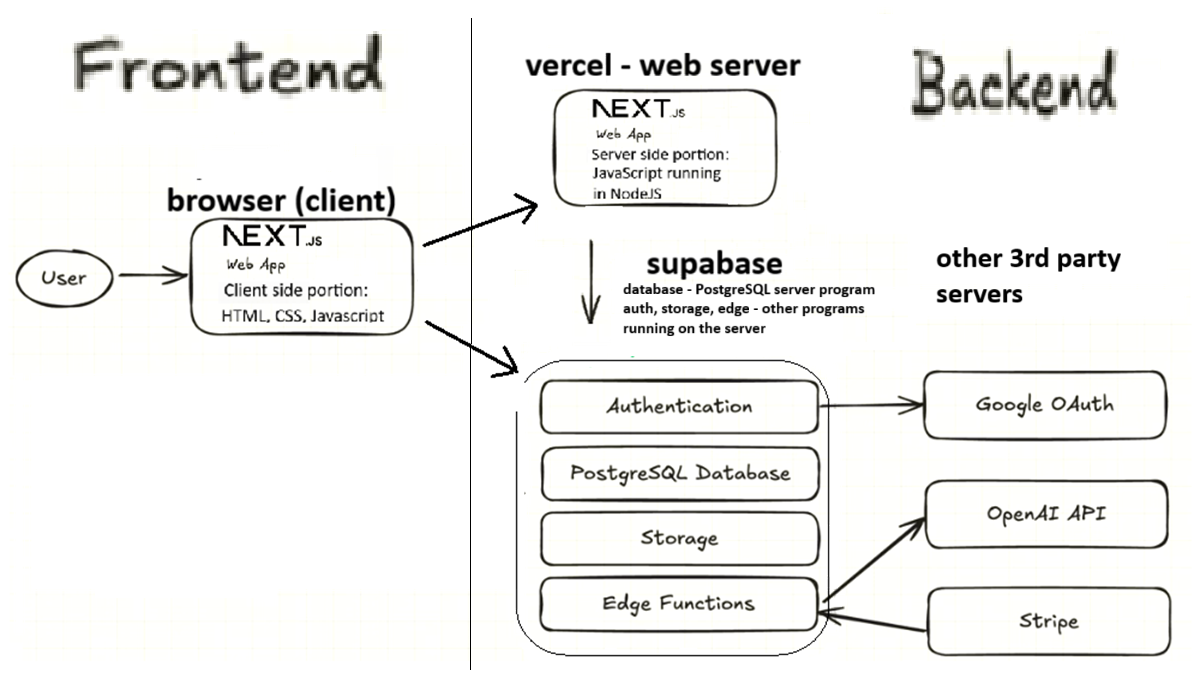
The full-stack tutorial in this book builds an app with a very similar shape. Its diagram is below; it uses OpenAI’s API where we use the Claude API, and runs some back-end code as Supabase Edge Functions:
41.4 Start small: the MVP
An MVP (minimum viable product) is the smallest version that real users can try. For ClubHub, version 1 could be: log in with Google, see upcoming events, sign up and cancel, and let officers create events. The waitlist, payments, emails and AI drafts come later, one at a time.
Starting small means less to build and debug, feedback from real members sooner, fewer accounts, keys and bills at first - and an AI makes far fewer mistakes on small, well-defined steps than on “build the whole app”.
41.5 Designing with Claude Code
As of Oct 6, 2026 · Official docs: Best practices for Claude Code · Permission modes (plan mode) · How Claude remembers your project
An AI coding agent is a fast, well-read partner for architecture - if you lead the conversation:
- Describe the problem, not the technology. Who are the users, what must they be able to do, and what are your constraints: budget, deadline, team skills, “members log in with school Google accounts”.
- Discuss in plan mode. In plan mode, Claude Code reads files and proposes a plan but doesn’t edit your files. Press
Shift+Tabuntil the status bar shows plan mode, or start withclaude --permission-mode plan(details in Permissions, Modes, and Safety). - Ask for options and trade-offs, not just one answer: two or three possible architectures compared on cost, complexity, free-plan limits and risks.
- Ask it to explain every piece in plain English - what it does, why it is needed, what happens if it fails - until you could explain the diagram to someone else.
- Let it interview you, then write a spec. Claude Code’s best-practices guide suggests asking Claude to interview you about the feature and then write the result to a file such as
SPEC.md(writing a file means leaving plan mode). Good specs say what is out of scope and how you will check that it works. Then start a fresh session to build from the spec. - Record lasting decisions in
CLAUDE.md, the file Claude Code reads at the start of every session: the stack, the commands to run, required environment variables, conventions (see CLAUDE.md and Memory). - Verify claims. Prices, free plans and library versions change faster than AI training data. Check the official pricing and documentation pages, or ask Claude to look up the current docs and show you its sources.
- Watch costs and secrets. List every paid service and its limits, keep keys in
.envfiles and host settings only, and never paste a real key into the chat.
A first prompt might look like this:
I'm planning a web app for student clubs (feature list below).
Constraints: three business students, beginner coders, $0 budget,
must be live in 6 weeks, members log in with school Google accounts.

Don't write any code yet.
1. Propose 2-3 possible architectures (front end, back end, database,
   login, hosting, email, payments) and compare them in a table:
   monthly cost at 100 and at 5,000 members, complexity, free-plan
   limits, and risks.
2. Recommend one and explain each piece in plain English.
3. Define a minimal first version (MVP) we can build in two weeks.
4. List the accounts, API keys and environment variables we will need.
For the spec, the best-practices guide offers this interview prompt (AskUserQuestion is the built-in tool Claude uses to ask you multiple-choice questions):
I want to build [brief description]. Interview me in detail using the AskUserQuestion tool.

Ask about technical implementation, UI/UX, edge cases, concerns, and tradeoffs. Don't ask obvious questions, dig into the hard parts I might not have considered.

Keep interviewing until we've covered everything, then write a complete spec to SPEC.md.
41.6 Checklist: questions to answer before coding
Users and features
- Who are the users, and what roles do they have (member, officer, admin)?
- What are the 3-5 must-have features of the MVP? What is explicitly out of scope?
Data and permissions
- What data will you store (tables and columns)? What is personal or sensitive?
- Who may see and change each kind of data? Where is that enforced (it must be the back end or database rules, not only the front end)?
Architecture and services
- Which front end, back end, database and login approach - and why?
- Which third-party services will you use? Which cost money, what are their free-plan limits, and what happens when you exceed them?
Secrets and costs
- Which keys exist, where are they stored in development and in production, and who has access? Are spending limits set?
Operations
- Where will development, previews and production run, and how do you deploy (push to GitHub)?
- How will you check that it works: a manual test checklist, automated tests, Claude testing it in a browser?
- What if a free plan pauses or sleeps before demo day? Who owns each account?
To see an app of this shape built step by step, work through the full-stack tutorial.
Practice Questions
Easy
Question 1 · Short answer
What is an MVP, and why start with one?
Question 2 · Matching
Match each ClubHub need with the building block that handles it.
| Need | Building block | |
|---|---|---|
| 1. Remember who signed up for which event | A. Payment service (Stripe) | |
| 2. “Log in with Google” | B. Email service | |
| 3. Pay for the ski trip | C. Database | |
| 4. Reminder the day before | D. Authentication (OAuth) |
Question 3 · True or false
The best first step with Claude Code is to describe your idea in one sentence and ask it to build the whole app right away.
Question 4 · Multiple choice
What does Claude Code do in plan mode?
- It writes and runs code without asking
- It reads files and proposes a plan, but doesn’t edit your files
- It only answers questions about Claude’s pricing
- It deploys your app to production
Medium
Question 5 · Scenario
Events have a capacity of 30. Where must the “no more than 30 confirmed sign-ups” rule be enforced, and what should happen to the 31st person?
Question 6 · Long answer
Write a prompt asking Claude Code for architecture options for your own app idea, without code. What must a good prompt include?
Question 7 · Compare
ClubHub has both a SPEC.md and a CLAUDE.md. What belongs in each?
Question 8 · Ordering
Put these steps in a sensible order: (a) build the MVP in small steps, (b) describe users, needs and constraints, (c) write a spec, (d) compare architecture options and pick one, (e) record the key decisions in CLAUDE.md.
Question 9 · Scenario
Claude tells you that a hosting service “has a generous free tier with unlimited projects”. What should you do before relying on it?
Question 10 · Short answer
Name the four main tables (or the three core ones) you would need for ClubHub, and what links a sign-up to a member and an event.
Hard
Question 11 · Scenario
Describe how the “AI drafts the event description” feature should work in this architecture: who calls the Claude API, where the key lives, and how you keep the cost under control.
Question 12 · Compare
For a beginner team, compare using Supabase (database and logins as a service) with writing your own Express API and PostgreSQL database on Render. Give one advantage of each.
Question 13 · Long answer
Identify three risks in the ClubHub architecture and how you would reduce each.
Question 14 · Scenario
A classmate proposes a shortcut: no back end and no database - each browser saves sign-ups in localStorage. What breaks?
Question 15 · Scenario
Version 1 is live. Now officers want paid events. What changes in the architecture, and how would you develop it safely?
Question 16 · Hands-on
Pick your own app idea. Start Claude Code in an empty folder in plan mode (claude --permission-mode plan) and use the first prompt on this page to get 2-3 architecture options. Then leave plan mode (press Shift+Tab), so that Claude may create files, and use the interview prompt to have it write SPEC.md. Review the result against this page’s checklist: which questions does the spec still not answer?