71 71. Project Architecture
71.1 Technical “Stack” (or just “tech stack”)
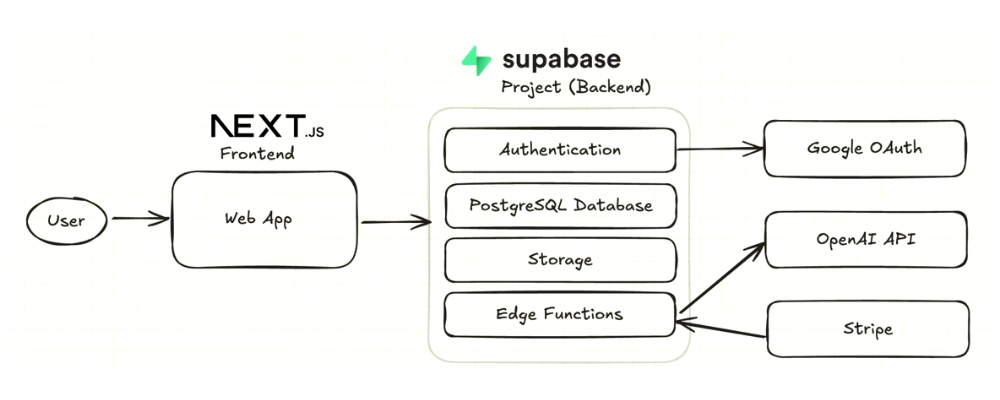
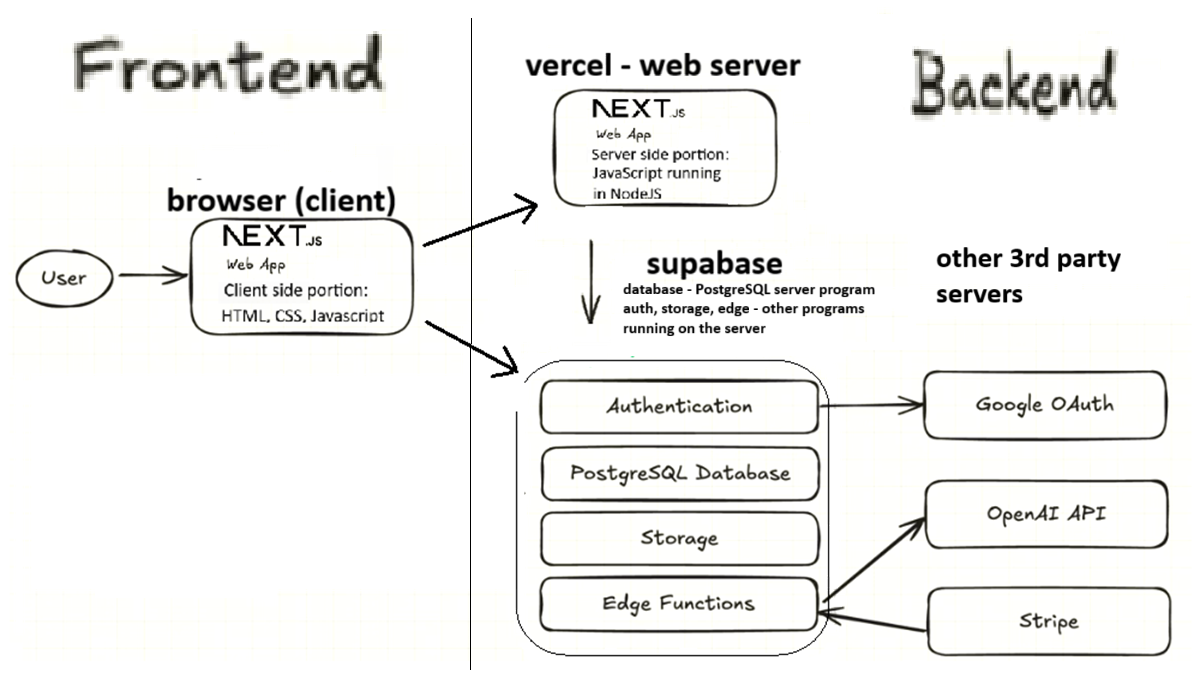
The following diagram highlights the various parts of the app and where they will be running. See below for an explanation of the diagram.
71.1.1 The following image is in the video:
71.1.2 I updated the image to make it a little more clear and accurate
71.2 Project Architecture
71.2.1 Frontend: Code that runs in the Browser
- Next.js
- Client library for Supabase integration
71.2.2 Backend: Web Server
- Vercel
- Next.js server side components
71.2.3 Backend: Supabase
PostgreSQL database
Storage system for storing the image files (similar to Amazon S3 storage)
Edge functions: small programs that run on Supabase’s servers; see Edge Functions below.
Built-in authentication system
71.2.4 Edge Functions
An Edge Function is a small program that runs on Supabase’s servers, not in the user’s browser. It waits until something calls it, by visiting its web address, does one job, sends back an answer, and stops. You don’t rent or manage a server for it: you upload the code, and Supabase runs it whenever it’s called. (This kind of hosting is called serverless; see “Virtual servers, containers, and serverless” in Hosting and Deployment.) “Edge” means that Supabase can run the function on servers in many places, close to the user.
Why the app needs them: some jobs need a secret key, and anything that runs in the browser can be read by anyone who opens the page. So the browser asks an Edge Function, and the function uses the key on the server, where nobody can see it. The task app has three, in the folder supabase/functions:
| Edge Function | What it does | Secret keys it uses |
|---|---|---|
create-task-with-ai |
Saves a new task and sends its title and description to OpenAI, which picks a label | OPENAI_API_KEY |
create-stripe-session |
Opens Stripe’s payment page or customer portal | STRIPE_SECRET_KEY, STRIPE_PRICE_ID |
stripe-webhook |
Receives Stripe’s message that a payment went through, and upgrades the user | STRIPE_SECRET_KEY, STRIPE_WEBHOOK_SECRET |
The keys reach the functions as secrets: named values that you store on Supabase with npx supabase secrets set NAME=value. The function’s code reads them by name; they never appear in the code or on GitHub. The functions are written in TypeScript and run on Deno, a JavaScript runtime similar to Node.js. In theory Supabase could have used Node.js; Deno is a common choice for TypeScript, and the reasons are beyond this tutorial.
71.2.5 Backend: Third-Party Services
- Google Cloud (for OAuth)
- OpenAI API (for asking AI to pick an appropriate “tag” for each task)
- Stripe (for payment processing)
71.3 Where Docker fits
Every part of the backend in the diagram runs on someone else’s computers: Vercel hosts the website, Supabase hosts the database, storage, authentication and edge functions, and Google, OpenAI and Stripe run their own services. So you don’t need Docker for this project, but you’ll hear about it.
Docker packages a program together with everything it needs (the right versions of its language, libraries and settings) into a container that runs the same way on any computer. A container image is the packaged program; a container is a running copy of it (Hosting and Deployment introduces the idea).
Professional teams often also run a complete copy of Supabase on their own laptops, to experiment without touching the real project. The Supabase CLI does this with npx supabase start, which downloads Supabase’s container images and runs them in Docker: a local database, local logins, local storage, and a local dashboard. That copy would replace the “Backend: Supabase” box in the diagram with containers on your own computer.
This course doesn’t do that: Docker needs a fairly recent computer and several GB of disk space. If you want to try it anyway, see “Deeper dive: Docker, and running Supabase on your own computer” in Step 5a: Supabase CLI command.
71.4 Keeping notes - Setup checklist
Over the course of this tutorial we will have to address all of the following in order to set up this project to work. The pages that follow go into more detail about each of these topics:
Many of these steps require keeping track of numerous URLs, “keys” and other “configuration information” for your project. Often the “configuration information” is generated on one website (e.g. Vercel, Supabase, Google Cloud console, Stripe) and must be copied to a different website or recorded in a specific file on your computer.
Keeping track of all this information can get VERY confusing, so keep it in one place: the course’s Task App Setup Worksheet (Excel). You type each value once on its My Info sheet (the Where to find it column says where on each website to look), and its Commands sheet builds the exact lines you copy into .env.local, the terminal and the websites. That makes it much easier to review your setup and debug it when there are problems. You can add your own notes, or screenshots in a separate document, to remember where you got each value and where you copied it to.
Much of this configuration information is “secret info”, like your passwords. Treat the worksheet as you would treat your passwords: keep it in ~/projects/full-stack-demo-app, next to the task-app folder and not inside it, so Git can never upload it to GitHub, and don’t share it.
71.5 Further Learning - tutorial folder
To learn more about the technologies listed above you can look at your project’s tutorial/ folder. This info was prepared by the original developer of this tutorial project and includes:
- Detailed auth guides.
- Database and RLS walkthroughs.
- Edge Function examples.
- Storage and Stripe integration deep dives.
71.6 Further Learning - official documentation
You can also refer to official docs:
- Supabase: https://supabase.com/docs
- Next.js: https://nextjs.org/docs
- Stripe: https://stripe.com/docs
- OpenAI: https://platform.openai.com/docs
Practice Questions
Easy
Question 1 · Multiple choice
In this project, which code runs in the user’s browser?
- The PostgreSQL database
- The client-side part of the Next.js web app (HTML, CSS and JavaScript), including the Supabase client library
- The Supabase edge functions
- Stripe’s payment processing
Question 2 · Matching
Match each part of the architecture with its job.
| Part | Job | |
|---|---|---|
| 1. Vercel | A. stores the app’s data | |
| 2. Supabase PostgreSQL database | B. stores the uploaded image files (similar to Amazon S3) | |
| 3. Supabase storage | C. the web server that runs the server side of the Next.js app | |
| 4. Supabase edge functions | D. lets users log in with their Google account | |
| 5. Google Cloud (OAuth) | E. processes payments | |
| 6. OpenAI API | F. TypeScript functions that run on Supabase’s servers | |
| 7. Stripe | G. uses AI to pick a “tag” for each task |
Question 3 · True or false
In this project, Vercel stores the image files that users attach to their tasks.
Question 4 · Fill in the blank
Supabase edge functions are written in ______ and run on ______’s servers, using the ______ runtime environment instead of Node.js.
Question 5 · Short answer
What is a “tech stack”? Name the main technologies in this project’s tech stack.
Medium
Question 6 · Ordering
Put the setup checklist in the order the page gives:
- Deploy edge functions
- Set up Stripe
- Run the database migrations
- Clone the project from GitHub
- Deploy the app to production (Vercel)
- Run and test the application on your computer
- Create Supabase project
- Check the storage bucket
- Configure OpenAI API
- Set up the Supabase CLI
- Set up Google OAuth
Question 7 · Short answer
Look at the architecture diagram. Which part of Supabase connects to Google OAuth, and which part connects to the OpenAI API and Stripe?
Question 8 · Short answer
Why does the page recommend keeping all your setup information in one place (the setup worksheet), and what goes in it?
Question 9 · Multiple choice
Your setup worksheet contains API keys and other configuration values. How should you treat it?
- Keep it inside the
task-appfolder and commit it, so you never lose it - Like your passwords: keep it private and don’t share it
- Paste it into the project’s README so teammates can find it
- Share it freely - configuration values are never secret
Question 10 · True or false
Supabase had no choice but to use Deno for its edge functions, because Node.js could not have been used for this.
Hard
Question 11 · Scenario
For each problem below, which part(s) of the architecture would you investigate first?
- “Log in with Google” fails.
- Tasks save correctly, but attaching an image to a task fails.
- New tasks are saved but never get an AI tag.
- The page for upgrading to a paid subscription doesn’t work.
Question 12 · Long answer
Explain the difference between the frontend and the backend in this project. Why is the backend spread across several companies’ servers (Vercel, Supabase, Google, OpenAI, Stripe) instead of running on one computer?
Question 13 · Short answer
The diagram shows Next.js in two places: in the browser and on Vercel’s web server. Why?
Question 14 · Scenario
A friend tells Maria: “To build a full-stack app with a database, you have to install Docker first.” Is that true for this project? Explain, using the architecture diagram, and say when Docker would be needed.