10b. Additions: More About Dictionaries#
Additions to Chapter 10: Dictionaries:
the get method of dictionaries (the chapter teaches get only in an exercise at the end of the chapter,
so this page states it here, where it is easy to find), how a program changes a dictionary, and a rule that
you must never break: do not change the keys of a dictionary in the body of a loop that goes through that
dictionary. Read this page after the chapter.
The practice questions at the end have answers: try each question first, then open its Answer.
Run the setup cell below first. It downloads thinkpython.py, the helper module the chapters use.
from os.path import basename, exists

def download(url):
    filename = basename(url)
    if not exists(filename):
        from urllib.request import urlretrieve

        local, _ = urlretrieve(url, filename)
        print("Downloaded " + str(local))
    return filename

download('https://github.com/AllenDowney/ThinkPython/raw/v3/thinkpython.py');
download('https://github.com/AllenDowney/ThinkPython/raw/v3/diagram.py');
download('https://y-rosenthal.github.io/yrThinkPython/yrdiagram.py');

import thinkpython
The get method#
Dictionaries have a method called get that takes a key and a default value. If the key
appears in the dictionary, get returns the corresponding value; otherwise it returns the
default value. Its general form is:
DICT.get(KEY, DEFAULT)
For example, here is a dictionary that maps letters to counts:
counts = {'b': 2, 'r': 2, 'o': 2}
print(counts.get('b', 0))
print(counts.get('c', 0))
2
0
'b' appears in the dictionary, so get returns its value, 2. 'c' does not appear, so get returns the default value, 0. Looking up a missing key with square brackets raises a KeyError; get returns the default instead.
Without a second argument, get returns None for a missing key:
counts = {'b': 2, 'r': 2, 'o': 2}
print(counts.get('b'))
print(counts.get('c'))
2
None
get is useful for counting. Without get, a counting loop needs an if statement to check
whether the key is already in the dictionary. With get, the update is one line:
counter[letter] = counter.get(letter, 0) + 1
If letter is already a key, get returns its count, and the line adds 1. If it is not a
key, get returns 0, and the line stores 1. Here is the counting function from the
chapter, written with get:
def value_counts(word):
    counter = {}
    for letter in word:
        counter[letter] = counter.get(letter, 0) + 1
    return counter

print(value_counts('brontosaurus'))
{'b': 1, 'r': 2, 'o': 2, 'n': 1, 't': 1, 's': 2, 'a': 1, 'u': 2}
Downey introduces get in the first exercise of Chapter 10: Dictionaries, which asks for this more concise version of value_counts.
Dictionaries are mutable#
A dictionary is mutable, as a list is: a program can change a dictionary after it makes it. It can add a
key, change the value of a key, and remove a key. del DICT[KEY] removes the key and its value:
counts = {'apple': 3, 'banana': 1}
counts['cherry'] = 2        # add a key
counts['apple'] = 4         # change the value of a key
del counts['banana']        # remove a key and its value
print(counts)
{'apple': 4, 'cherry': 2}
A program cannot change a key itself: keys are immutable values, such as strings and numbers (Chapter 10, “Lists and dictionaries”). To “rename” a key, a program removes the old key and adds a new key with the same value.
y = x and a copy#
Because a dictionary is mutable, two variables that refer to the same dictionary see the same changes. Make a
dictionary x, a second variable y with y = x, and a third variable z with z = dict(x). dict(x) makes
a copy: a new dictionary with the same keys and values (“Creating dictionaries” in Chapter 10).
x = {'apple': 3}
y = x
z = dict(x)
print(x is y, x is z, x == z)
True False True
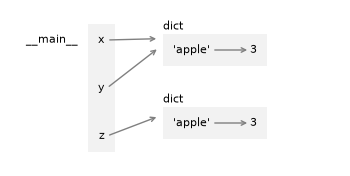
In the state diagram, the arrows of x and y end at the same dictionary, and the arrow of z at another
one. (The gray box __main__ holds the variables, as in the stack diagrams of the book; each arrow goes from
a variable to the object that it refers to.)
Now change the dictionary through y:
x = {'apple': 3}
y = x
z = dict(x)
y['banana'] = 5
print('x:', x)
print('y:', y)
print('z:', z)
x: {'apple': 3, 'banana': 5}
y: {'apple': 3, 'banana': 5}
z: {'apple': 3}
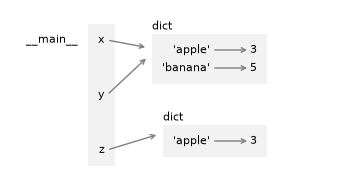
x shows the new key too: x and y refer to one dictionary, and the assignment changed it. z refers to its
own dictionary, so it does not change. The same is true for lists (“9b. Additions: Iterables, and Changing a
List in a Loop”, “Lists are mutable”). A string, a number or a tuple cannot change at all (“8b. Additions:
String Methods”, “Strings are immutable”).
Never change the keys of a dictionary in a loop over it#
A for loop over a dictionary gets its keys (“Looping and dictionaries” in Chapter 10).
The rule: in the body of a for loop that goes through a dictionary, never change the keys of that
dictionary: do not add a key, do not remove a key, and do not rename a key. Code that does this is very
bad code. Python stops some of these loops with an error, and lets others run and give a wrong result.
Never write such code. The same rule is true for lists (“9b. Additions: Iterables, and Changing a List in a
Loop”).
Changing the value of a key that is already in the dictionary is allowed: the keys stay the same (see “Changing the values is allowed” below).
Removing or adding a key: an error#
The task: remove the words whose count is less than 3. This loop removes keys from the dictionary that it
goes through. Python finds that the number of keys changed, and stops with a RuntimeError:
counts = {'apple': 3, 'banana': 1, 'cherry': 2, 'date': 7}
for word in counts:
    if counts[word] < 3:
        del counts[word]
RuntimeError: dictionary changed size during iteration
A loop that adds a key to the dictionary that it goes through stops with the same error.
Renaming keys: an error, or a wrong result without an error#
The task: change each key to uppercase. This loop renames each key: it removes the old key and adds the new key. The number of keys stays the same, but the loop still goes wrong. It displays each key that it gets:
counts = {'apple': 3, 'banana': 5, 'cherry': 2, 'date': 7}
for word in counts:
    print('renaming', word)
    value = counts[word]
    del counts[word]
    counts[word.upper()] = value
renaming apple
renaming banana
renaming APPLE
renaming BANANA
RuntimeError: dictionary keys changed during iteration
The loop got the new keys APPLE and BANANA, and never got cherry and date. Then Python stopped it
with a different message. When it stopped, the dictionary was half changed:
{'cherry': 2, 'date': 7, 'APPLE': 3, 'BANANA': 5}.
Worse, the same code can run without an error. With a dictionary of 3 keys, this loop gives the right result:
counts = {'apple': 3, 'banana': 5, 'cherry': 2}
for word in counts:
    value = counts[word]
    del counts[word]
    counts[word.upper()] = value
print(counts)    # right by chance: never write this loop
{'APPLE': 3, 'BANANA': 5, 'CHERRY': 2}
So the code passes a test with one dictionary and fails with another. What happens depends on the number of keys, and it can be different in another version of Python. You cannot trust such a loop.
The right way: make a new dictionary#
Let the loop go through one dictionary, and let the body change another dictionary:
counts = {'apple': 3, 'banana': 1, 'cherry': 2, 'date': 7}
common = {}
for word in counts:
    if counts[word] >= 3:
        common[word] = counts[word]
print(common)
{'apple': 3, 'date': 7}
counts = {'apple': 3, 'banana': 5, 'cherry': 2, 'date': 7}
upper_counts = {}
for word in counts:
    upper_counts[word.upper()] = counts[word]
print(upper_counts)
{'APPLE': 3, 'BANANA': 5, 'CHERRY': 2, 'DATE': 7}
The original dictionary counts does not change. If the program needs the new dictionary in the variable
counts, assign it after the loop: counts = upper_counts.
Changing the values is allowed#
This loop changes the value of each key. It does not add, remove or rename a key, so the loop gets each key once, and the result is right:
counts = {'apple': 3, 'banana': 1, 'cherry': 2}
for word in counts:
    counts[word] = counts[word] * 2
print(counts)
{'apple': 6, 'banana': 2, 'cherry': 4}
Practice questions#
Question 1 (easy): what is displayed?#
Predict what this code displays. Then run the cell to check (on the website, click Show code cell output).
scores = {'ana': 90, 'ben': 85}
print(scores.get('ana', 0))
print(scores.get('cy', 0))
Answer
90
0
'ana' is a key, so get returns 90. 'cy' is not a key, so get returns the default value, 0.
Question 2 (easy): what is displayed?#
Predict what this code displays. Then run the cell to check (on the website, click Show code cell output).
scores = {'ana': 90, 'ben': 85}
print(scores.get('ana'))
print(scores.get('cy'))
Answer
90
None
Without a second argument, get returns None for a missing key.
Question 3 (medium): what is displayed?#
Predict what this code displays. Then run the cell to check (on the website, click Show code cell output).
counter = {}
for letter in 'banana':
    counter[letter] = counter.get(letter, 0) + 1
print(counter)
Answer
{'b': 1, 'a': 3, 'n': 2}
Each time through the loop, get returns the count so far, or 0 for a letter seen for the first time. The word banana has 1 b, 3 as, and 2 ns.
Question 4 (medium): write a function#
Write a function called definition that takes a dictionary of word definitions and a word, and returns the definition of the word. If the word is not in the dictionary, the function returns 'No definition found'. Use get.
For example, with d = {'apple': 'a fruit', 'book': 'a set of pages'}, definition(d, 'apple') returns 'a fruit', and definition(d, 'zebra') returns 'No definition found'.
Start from this header (replace ... with the body):
def definition(d, word):
    ...
Answer
def definition(d, word):
    return d.get(word, 'No definition found')
get returns the definition when the word is a key, and the default message when it is not.
Question 5 (medium): what happens?#
What happens when this code runs? Then write code that makes the dictionary that the programmer wanted:
{'pen': 2, 'book': 10, 'pens': 4, 'books': 20}.
prices = {'pen': 2, 'book': 10}
for item in prices:
    prices[item + 's'] = prices[item] * 2
print(prices)
Answer
The body adds a key ('pens') to the dictionary that the loop goes through, so Python stops the loop with
RuntimeError: dictionary changed size during iteration, and the print line never runs.
Put the new keys in a new dictionary, and add them to prices after the loop:
prices = {'pen': 2, 'book': 10}
plurals = {}
for item in prices:
    plurals[item + 's'] = prices[item] * 2
for item in plurals:
    prices[item] = plurals[item]
print(prices)
The first loop goes through prices and changes plurals. The second loop goes through plurals and changes
prices. Neither loop changes the dictionary that it goes through.
Question 6 (medium): what is displayed?#
Predict what this code displays. Then run the cell to check (on the website, click Show code cell output).
stock = {'pen': 5, 'book': 0, 'cup': 2}
for item in stock:
    stock[item] = stock[item] + 10
print(stock)
Answer
{'pen': 15, 'book': 10, 'cup': 12}
The body changes only the values. The keys stay the same, so this loop is allowed: it gets each key once, and adds 10 to each value.
Question 6b (medium): what is displayed?#
Predict what this code displays. Then run the cell to check (on the website, click Show code cell output).
prices = {'pen': 2}
other = prices
backup = dict(prices)
other['pen'] = 3
backup['cup'] = 4
print(prices)
print(other)
print(backup)
Answer
{'pen': 3}
{'pen': 3}
{'pen': 2, 'cup': 4}
prices and other refer to the same dictionary, so other['pen'] = 3 changes the value that prices shows
too. dict(prices) made a copy before that change, so backup still has 2 for 'pen', and only backup gets
the key 'cup'.
Question 7 (hard): write a function#
Write a function called remove_rare that takes a dictionary of word counts and a whole number minimum, and
returns a new dictionary with only the words whose count is minimum or more. The function must not
change the dictionary that it gets.
For example, with counts = {'the': 9, 'cat': 2, 'sat': 1, 'on': 4}, remove_rare(counts, 3) returns
{'the': 9, 'on': 4}, and counts does not change.
Start from this header (replace ... with the body):
def remove_rare(counts, minimum):
    ...
Answer
def remove_rare(counts, minimum):
    result = {}
    for word in counts:
        if counts[word] >= minimum:
            result[word] = counts[word]
    return result
The loop goes through counts, and the body adds keys to result, a different dictionary. A version that
deletes keys from counts in the loop would stop with a RuntimeError, and would also change the caller’s
dictionary.
Credits#
Additions by Prof. Y. Rosenthal, for Think Python: 3rd Edition by Allen B. Downey. Text license: Creative Commons Attribution-NonCommercial-ShareAlike 4.0 International